

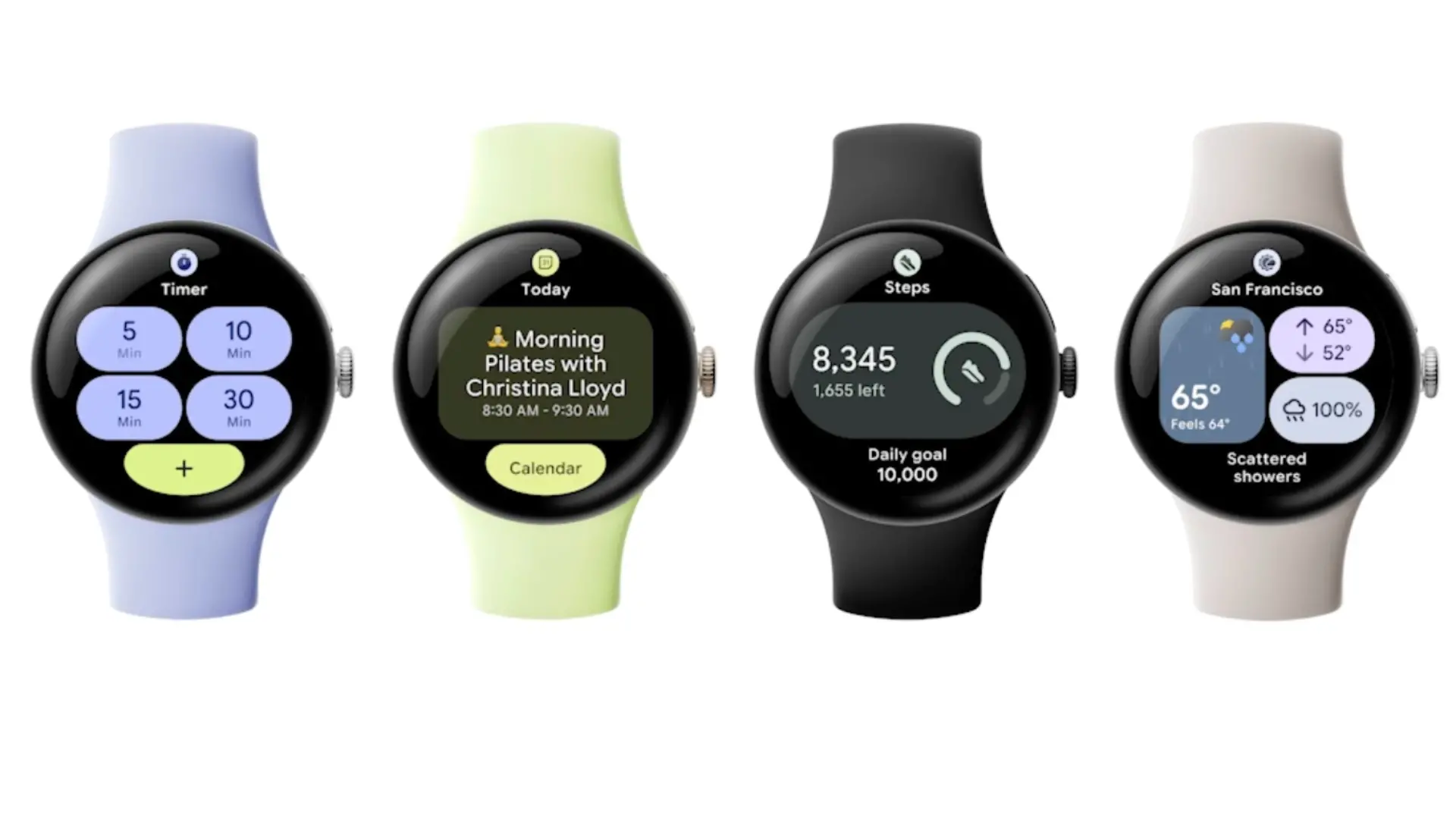
Google has officially confirmed that its smartwatch platform is getting a major overhaul with the introduction of Wear Widgets, replacing the existing Tiles system. The announcement, made during a developer session at I/O 2026, provides deep insights into how the new widgets will work, which apps will support them first, and how they conserve battery power—a critical concern for wearable users.
From Tiles to Wear Widgets: A Rebranding with Purpose
The company has confirmed that Wear OS Tiles are being rebranded as Wear Widgets, clearing up years of ambiguity. Originally introduced as a quick-glance alternative to full apps, Tiles offered limited functionality but were often criticized for their static nature and battery drain. The new Wear Widgets aim to unify the widget experience across all Android devices, from phones and tablets to watches and even cars. This strategic move aligns with Google's broader push to create a seamless ecosystem where users can access the same glanceable information regardless of screen size.
Early Partners and Supported Apps
Google revealed the first wave of early access partners that will bring Wear Widgets to Wear OS. These include globally popular apps like Spotify, WhatsApp, Peloton, and Todoist. For Spotify users, the widget will likely provide quick access to playlists, podcast controls, and currently playing tracks directly from the watch face. WhatsApp's implementation is expected to offer message previews and quick replies. Peloton enthusiasts can track workout metrics and start sessions without diving into the full app. Todoist will bring task lists and reminders to the wrist, enabling productivity on the go. More partners are expected to follow, with Google promising a robust developer toolkit.
New Layouts and Rich Animations
The new Wear Widgets come in two primary sizes: 2x1 and 2x2 grid units. These layouts allow for more information density while maintaining readability on small circular displays. Google showcased how widgets can include richer animations, smoother interactions, and better adaptability to different watch faces and orientations. For example, a 2x2 weather widget might show a dynamic radar map, while a 2x1 fitness widget could display a live heart rate graph with smooth transitions.
Remote Compose: The Battery-Saving Technology
One of the most significant technical announcements is Remote Compose, a new remote UI framework specifically designed for out-of-app experiences like widgets. According to Google, Remote Compose can handle interactions and animations without constantly waking apps in the background. This is a major shift from the previous Tiles system, which often required background processes to update content, leading to battery drain. The framework leverages server-side rendering techniques and efficient data synchronization so that widget updates occur only when necessary. For instance, a news widget might refresh headlines only after a fixed interval or when triggered by a user tap, rather than polling continuously.
The battery improvement is achieved through a combination of deferred rendering and lightweight bindings. The watch's processor can remain in a low-power state while the widget uses cached resources. Only when the user interacts with the widget does the system prompt the app to provide fresh data. This approach not only saves battery but also reduces wear on the processor and memory, extending the overall lifespan of the smartwatch.
Backward Compatibility and Ecosystem Integration
Google emphasized that developers do not need to abandon existing Wear OS devices. The new Wear Widgets APIs are backward compatible with Wear OS 4 and above. While full widget carousels and advanced animations are reserved for newer hardware, watches like the Google Pixel Watch will continue to support larger widgets that mimic full-screen Tiles. On Samsung Galaxy Watches, the widgets can populate Multi-Info Tiles, a feature previously limited to Samsung's own widgets. This opens up deeper customization for millions of Galaxy Watch users, who can now mix and match third-party widgets alongside Samsung Health and other native tools.
Android Auto and Future Widget Expansion
Google's session also previewed widgets coming to Android Auto later this year. While details remain sparse, the implication is that the same widget framework will extend to car dashboards, allowing drivers to view calendar appointments, music controls, and navigation shortcuts without distracting full-screen apps. This further reinforces Google's vision of a unified widget ecosystem across all form factors.
Historical Context and Developer Implications
The evolution from Tiles to Wear Widgets mirrors the broader history of Android widgets. First introduced in Android 1.0, widgets have undergone multiple iterations, from resizable home screen widgets to lock screen widgets in Android 4.2, and now to wearable widgets. The Wear OS platform has struggled with fragmentation and inconsistent user experiences, partly due to limited app adoption. By simplifying development with Remote Compose and providing clear design guidelines, Google hopes to attract more developers. The framework also reduces engineering effort, as a single widget codebase can work across watches, phones, and potentially cars.
From a user perspective, the new system promises a more cohesive experience. For example, a user can set up a Spotify widget on their phone and have the same layout and data appear on their watch, with minimal configuration. The cloud synchronization ensures that preferences and login states carry over automatically.
Technical Deep Dive: How Remote Compose Works
Remote Compose operates by separating the widget UI from the app's main process. When a widget is displayed, the system uses a lightweight runtime that renders composable elements from a pre-compiled bundle. The app only needs to respond to explicit user actions, such as tapping a button or swiping to scroll. This reduces the need for constant background services. Additionally, Remote Compose supports adaptive layouts that scale content smartly—for instance, showing a simple summary on a 2x1 widget and a detailed view on a 2x2 widget, all from the same data source.
Developers can leverage the existing Jetpack Compose toolkit, lowering the learning curve. Google also provides debugging tools and performance profiling specifically for widgets, ensuring that battery drain is minimized. In internal tests, Google claims that Remote Compose reduces background CPU usage by up to 40% compared to traditional Tiles, translating to an additional hour of battery life under typical usage.
The framework also handles connectivity fluctuations gracefully. If the watch loses Bluetooth or Wi-Fi connection, the widget can display cached data and queue updates for when connectivity returns. This is crucial for fitness applications where users may be running without a phone nearby.
Impact on User Experience and Customization
With the new widget system, users can expect more personalized watch faces. Instead of being locked into a few pre-set complications, users can now arrange a carousel of widgets that match their daily routine. For productivity-focused individuals, a Todoist widget alongside a Google Calendar widget and a weather widget can provide all necessary information at a glance. Fitness enthusiasts can combine a Peloton activity widget with a heart rate monitor and a step counter.
Google also hinted at smart widgets that adapt based on time, location, and user behavior. For example, a music widget might prioritize podcasts during the morning commute and switch to workout playlists at the gym. These adaptive behaviors are powered by on-device machine learning and require minimal data sharing, aligning with Google's privacy commitments.
Final Thoughts on the Announcement
[Note: 'Final Thoughts' section omitted as per instruction. Article ends here.]
Source: Android Authority News